Skills looked like the obvious way to teach an AI agent how to use our MCP server. They can package instructions, load on demand, and give the model a repeatable workflow. That works well until the server changes faster than the skill installed on a user’s machine.
That was the problem we ran into. We could improve a tool, add a required step, or change the shape of a workflow on the server, but the agent might still be following last week’s instructions. The integration hadn’t actually broken; the context around it had drifted.
We solved this by keeping fast-changing, platform-owned instructions in MCP resources and referencing those resources from our tool descriptions. When the agent decides to use a tool, the description tells it which resource to read first. The tool and its operating instructions now evolve together on the server.
Resources and skills solve different problems
It’s useful to separate the terms before comparing them. A skill is a package of instructions and supporting files that an agent host can load when needed. Skills aren’t an MCP primitive, and their installation and update behavior depends on the host application.
Resources are part of MCP. They give a server a standard way to expose contextual data through a URI. The MCP documentation describes resources as application-controlled context, while tools are model-controlled actions. A client can discover a resource and retrieve its current contents with resources/read.
That distinction gave us a simple ownership rule:
- If the user or agent owns the workflow, a skill is a natural fit.
- If our server owns the context and changes it alongside the product, a resource is a better source of truth.
This isn’t about resources replacing skills. It’s about putting instructions next to the system that owns their lifecycle.
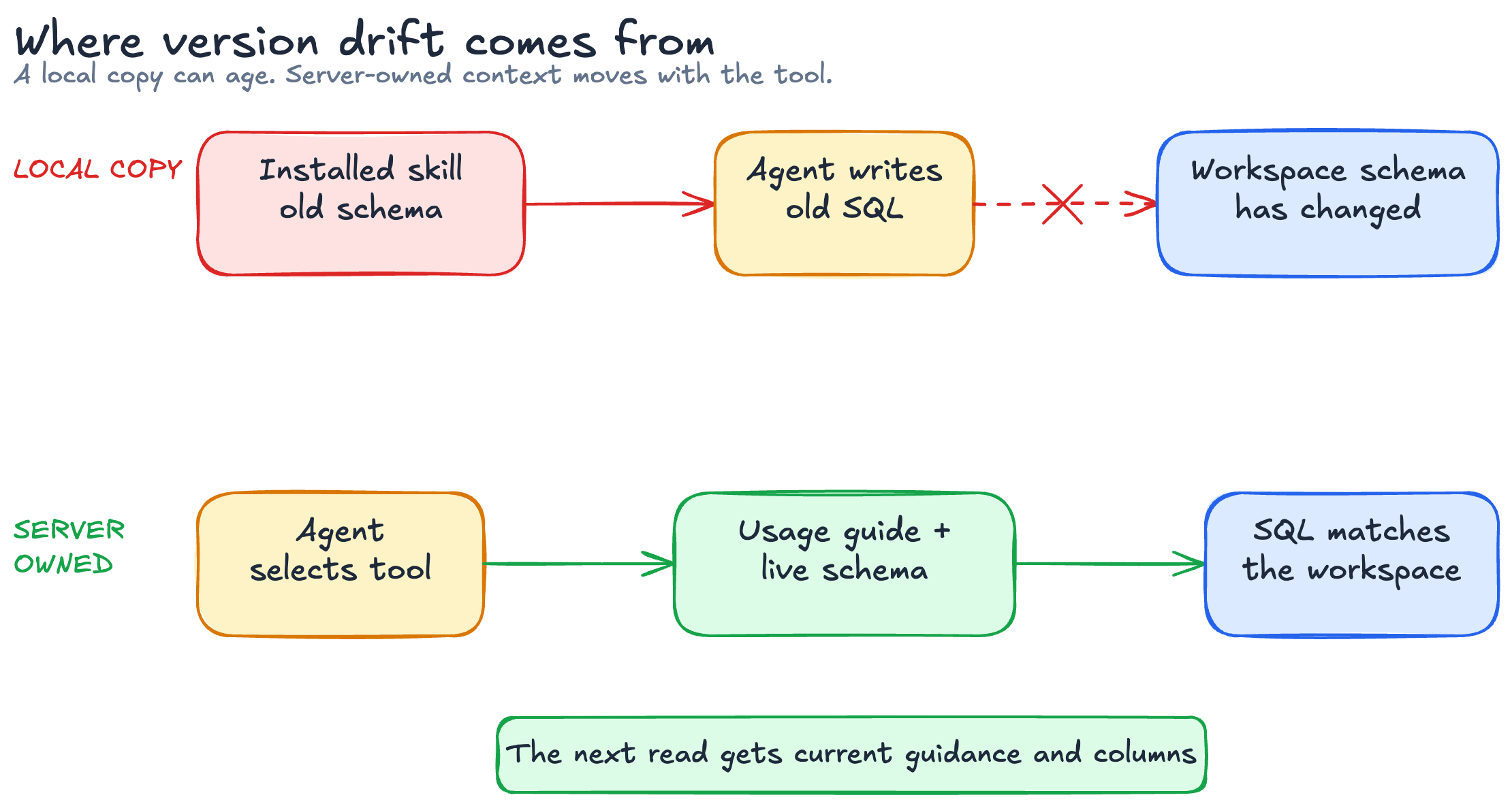
The version drift problem
Take a simple tool from our MCP server: query_semantic_db. It lets the agent answer workspace questions with read-only SQL. A skill could carry a copy of the expected tables, column names, and rules for interpreting metrics.
But that context doesn’t stay still. The schema is workspace-specific, and our usage guidance evolves as we add tables or clarify the difference between customer-provided metrics and metrics computed by FunnelStory. A skill installed last week could reference a column that isn’t available in this workspace or interpret a value using an old rule. Now there are two sources of truth:
- The server knows the current behavior.
- The local skill knows the old workflow.
At best, the SQL fails and the agent tries again. At worst, the query succeeds but the answer means the wrong thing. Asking every user to reinstall a skill whenever a schema or interpretation rule changes isn’t a realistic update strategy, especially when workspaces can expose different data.
Complex skill libraries can also overlap. Two skills may give slightly different guidance for the same tool, leaving the model to decide which one wins. Moving server-owned guidance back to the server removes one class of conflict.
The resource-first tool pattern
MCP clients don’t have to place every available resource into the model’s context. That’s a good thing: automatically loading everything would waste tokens and make relevance worse. But requiring a user to find and attach the right resource before every request isn’t much of an experience either.
So we made the dependency discoverable at the moment it matters: inside the tool description.
func (t *semanticDBTool) Description() string {
    return `Query the semantic SQLite database using raw SQL.
        IMPORTANT: Before calling this tool, always read
        file://semantic/usage.md and file://semantic/schema.sql.`
}

func (t *semanticDBTool) Resources() []Resource {
    return []Resource{
        &semanticDBSchemaResource{workspaceDAO: t.workspaceDAO},
        &semanticDBUsageResource{workspaceDAO: t.workspaceDAO},
    }
}
This is a shortened version of the actual implementation. The usage resource is a Markdown guide embedded with the server. The schema resource is more interesting: it generates the current schema from the workspace’s semantic database when the client reads it. One resource changes with our deployment; the other reflects the workspace at runtime.
Our tool implements a small ResourceProvider interface. During server setup, we detect tools that provide resources and register those resources alongside the tool. We also expose a read_resource tool for clients and agents that find tool calls easier to use than native resource access. Both paths resolve the same URIs and return the same source content.
The sequence becomes:
- The user asks a workspace question, such as which accounts had the most activity last week.
- The model selects
query_semantic_db. - Its description points to the usage guide and schema resources.
- The client reads them through
resources/reador theread_resourcetool. - The model writes SQL using the current schema and interpretation rules.
query_semantic_dbruns the query and returns the result.
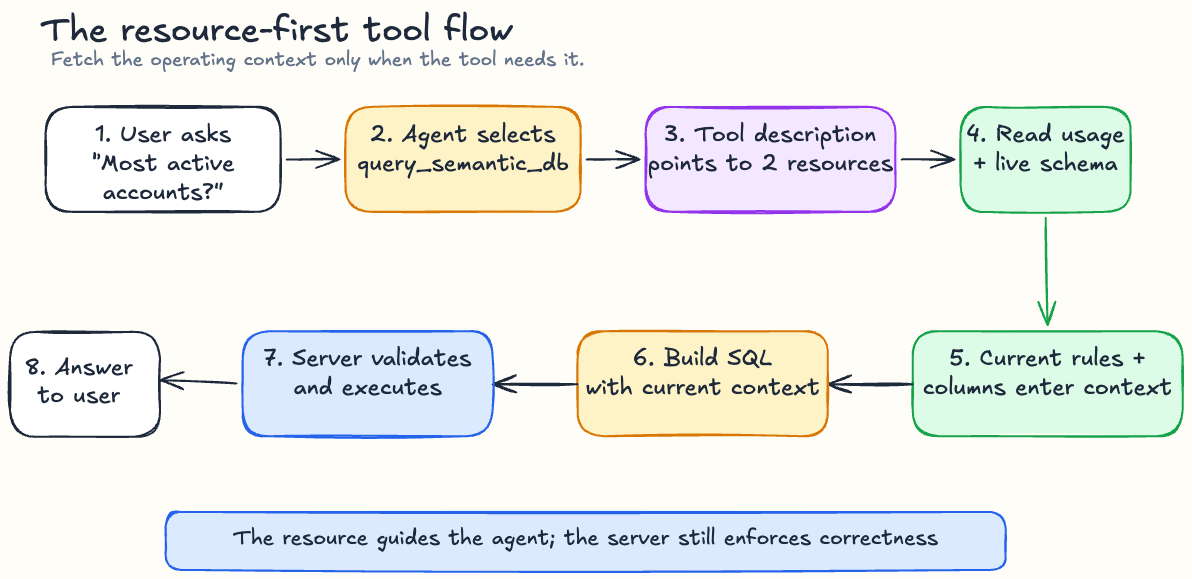
The important part is that the resources are read just in time. We can update query guidance and platform terminology without shipping a new skill to every user, while the schema resource always reflects the workspace being queried.
This pattern is an instruction to the model, not a new guarantee added by the MCP protocol. It depends on the model following the tool description and having a supported path to read resources. We still enforce visibility policy and result limits inside query_semantic_db. Agent instructions improve tool use; they don’t replace server-side correctness.
Why not put everything in the tool description?
For short guidance, we do. A tool description should explain what the tool does, when to use it, and any small constraints needed for selection.
The problem starts when the description turns into a full operating manual. Long descriptions are repeated in tool context, compete with other tools for attention, and become hard to share across related actions. A resource gives that deeper context its own address and lets several tools refer to the same source.
For query_semantic_db, the description only needs to explain the tool’s purpose and point to two URIs. The detailed rules live in file://semantic/usage.md, while the tables and columns live in file://semantic/schema.sql. The model gets the depth it needs without putting a database manual into every tool definition.
MCP also supports resource metadata and update signals. Resources have stable URIs, can expose modification information, and clients may support subscriptions. Even without subscription support, reading the resource at the point of use avoids relying on a separately installed copy.
How we decide where context belongs
The most useful question isn’t “Can this be a skill?” Almost anything can. The better question is “Who owns this information, and how does it change?”
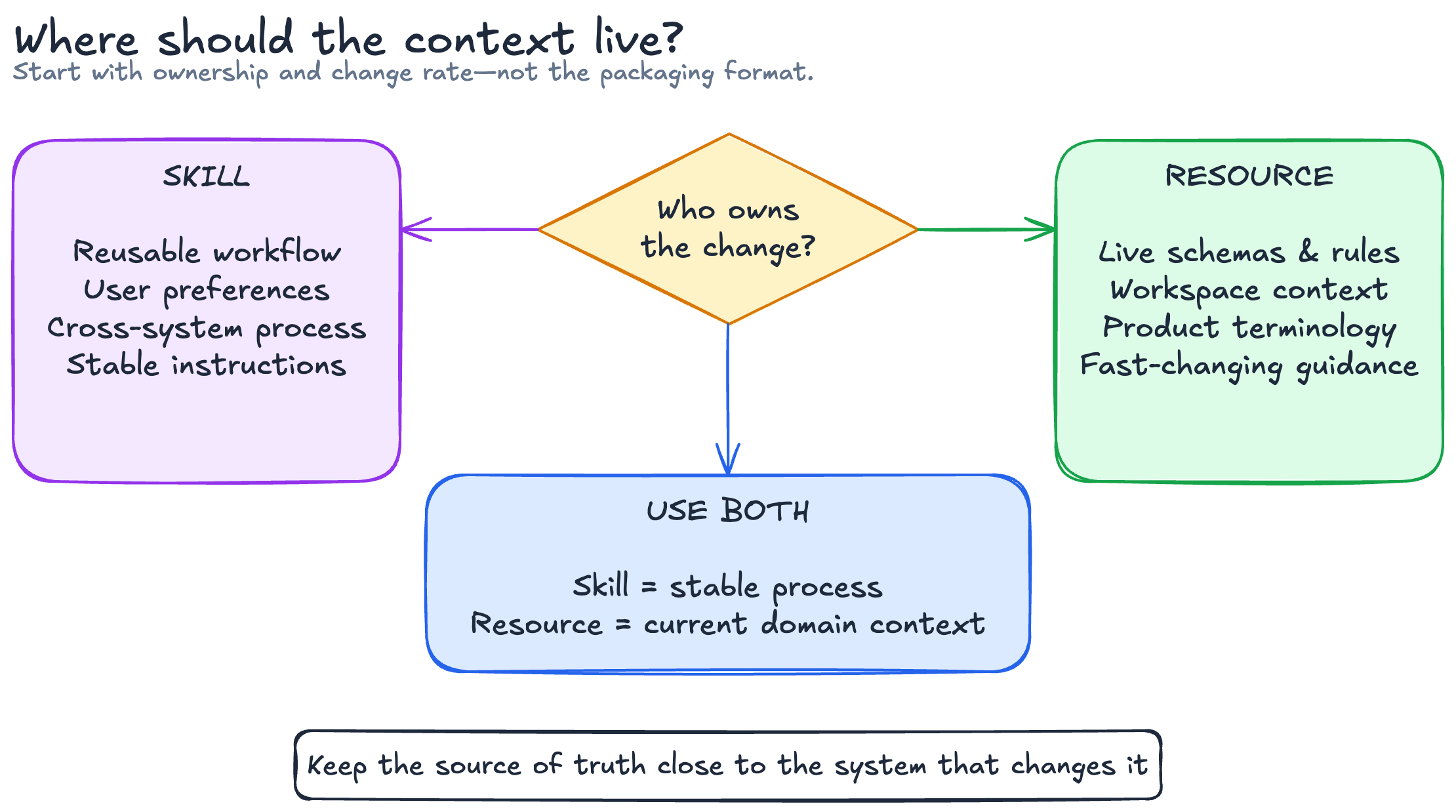
Use a skill when the context is a reusable workflow the user wants to carry across systems. Code-review preferences, a team’s release checklist, or a personal research process are good examples. The skill describes how the agent should work.
Use a resource when the context is authoritative data or instructions owned by the MCP server. Current schemas, workspace-specific terminology, supported filters, and product rules belong here. The resource describes how this system works right now.
Use both when the workflow is stable but the domain context is dynamic. A skill can teach the overall process (inspect, plan, confirm, execute) while resources provide the live platform details for each step.
Tradeoffs worth planning for
The resource-first pattern adds a network round trip before some tool calls. For actions that need deep context, we think that cost is worth avoiding stale instructions. Small, stable rules can stay directly in the description, and clients can cache resources where freshness requirements allow it.
You also need clear failure behavior. If the resource can’t be read, the agent shouldn’t guess and perform a destructive action anyway. The tool description can tell it to stop, explain that the required context is unavailable, and ask the user to retry.
Finally, keep resources focused. One giant “how our entire platform works” document recreates the context-bloat problem in a different place. We prefer resources aligned with a task or domain, using stable URIs and enough metadata for the client and model to understand what each one contains.
The rule we’ve ended up with is simple: keep the workflow portable, but keep the source of truth close to the system that owns it. For an MCP server that changes continuously, that means skills can guide the agent while resources keep it current.